Table of Contents
You’ve probably tested dozens of “free” AI tools over the past year. Download one, hit a message limit after 20 minutes. Try another, discover the free tier is a marketing fiction designed to push you toward a $20/month subscription. The pattern repeats: excitement, frustration, paywall.
This happens because most “free” offerings aren’t actually free—they’re freemium traps. The company lets you taste the product, then strategically limits what you can accomplish until you upgrade.
But some tools break this pattern. Some actually deliver unlimited value without hidden costs or artificial limitations.
This guide is based on research of real user experiences from Reddit, product forums, and documented case studies showing which tools deliver genuine value and which ones waste your time. You’ll learn what users are actually accomplishing with free AI tools—the specific hours saved, problems solved, and workflows completed.
What you’ll learn:
- Which “free” tools are secretly charging for basic features
- Tools with genuinely unlimited free tiers (and what users accomplish with them)
- How to evaluate whether a tool’s free tier is worth your time
- A quick scorecard comparing all major free AI tools
The Freemium Trap Problem: Why Most “Free” Tools Aren’t
The biggest mistake when evaluating free tools is treating all free tiers the same. Some are generous; others are designed specifically to frustrate you into upgrading.
Here’s what’s actually happening with the most popular “free” tools right now.
ChatGPT’s Disappearing Free Tier
The Limitation:
- 10 messages every 5 hours
- Access to GPT-4o mini (downgraded from full GPT-4)
- 2-3 images per day with DALL-E
What Users Report:
Reddit users describe the experience as a “taste-test model.” One user reported hitting the message limit after just 20 minutes of trying to solve a coding problem. Another noted: “It feels like ChatGPT is being phased out” as the free tier shrinks every quarter.

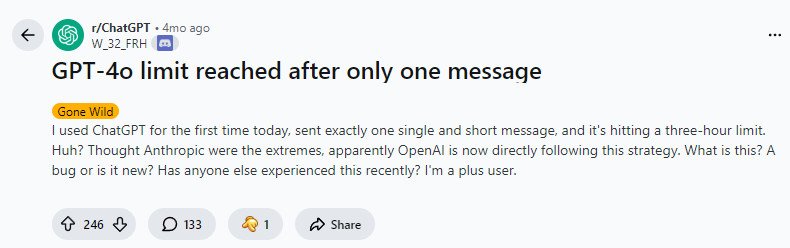
Users comparing ChatGPT free against Gemini Pro free, report using ChatGPT for roughly 60-70% of their queries, then switching to Gemini when they hit the limit.
The Pattern:
The message limit is clearly intentional. You get just enough functionality to understand the product’s value, then immediately hit a paywall. It’s not designed to be sustainable for any meaningful work.
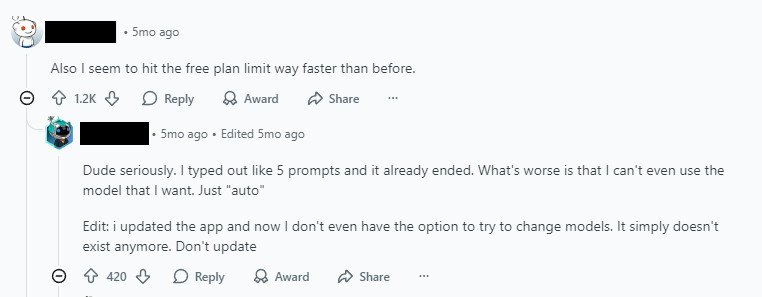
Verdict: Too limited for actual work. Feels like “phasing out” the free tier.
Canva’s Hidden Collaboration Costs (The Deceptive One)
What Canva Advertises:
“Free team collaboration” appears prominently on their website.
What Actually Happens:
Canva’s free tier allows solo design, but “free team collaboration” is misleading marketing. To actually share a team workspace with colleagues, you must pay ~$400/year per person (AUD pricing).
One user on Reddit discovered this after inviting their team, expecting it to be free: “The website says ‘collaborate for free’ but then charged $400/year when I tried to create a shared team account.”
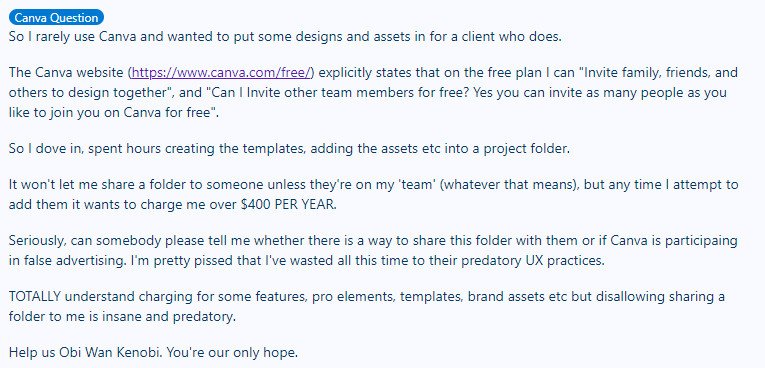
Users describe this as “predatory UX practices.” The company recently doubled pricing and removed the free team tier entirely.
What Actually Works Free:
- Individual graphic creation ✓
- Social media templates ✓
- YouTube thumbnails ✓
- Presentations ✓
What Requires Payment:
- Team collaboration → $$$
- Advanced features → $$$
Verdict: Solo use is OK, but the “free collaboration” claim is false advertising.
Zapier’s Useless 100-Task Limit
The Limitation:
- 100 tasks per month (sounds good until you actually try to use it)
- NO multi-step workflows allowed
- Single-trigger workflows only
What Users Say:
“The capabilities are quite restricted,” one user reported after hitting the limit. Others describe it as “too limiting to be useful.”
Real use cases Reddit users mentioned:
- Facebook Leads → Google Sheets (single-step, works free)
- Email management (single-step, works free)
- Data syncing between 2 apps (single-step, works free)
But anything requiring multiple steps (trigger → transform → action)? You need a paid plan.
The Workaround:
Users are actively switching to Make.com’s free tier, which offers more generous limits and actual multi-step workflows.
Verdict: Free tier is too restrictive for real automation. Better alternatives exist.
Claude’s Quick Burnout
The Reality:
Claude has a free tier, but the usage limits hit fast. Users report burning through their weekly limit in 1-2 days with basic use.
User Workaround (Unsustainable):
Some users have created 6+ free Claude accounts to extend usage. This isn’t a solution—it’s confirmation the free tier isn’t designed for real daily use.
Why Users Love Claude Despite the Limits:
One user noted: “Claude performs better than all other alternatives for coding tasks.” But the question becomes: Is paying $20/month worth it, or should you save the free tier for emergency coding help?
Low-income developers specifically looking for free alternatives reported Claude’s limits as their main pain point.
Verdict: Free tier is generous but unsustainable for consistent work.
Tools With Genuinely Useful Free Tiers (Real Value)
Now the tools that break the pattern. These have free tiers that actually deliver.
Notion — The True Free Tier Champion
The Numbers:
87% of Notion’s 30 million users stay on the free tier indefinitely. Only 13% of users pay. Yet the company generates $567 million ARR (Annual Recurring Revenue).
How? Their free tier is actually unlimited.
What You Get (Free):
- Unlimited pages
- Unlimited database blocks
- Unlimited note-taking
- No feature restrictions for solo use
- Only limitation: collaboration is capped at 10 guest shares
Real User Applications:
- Personal knowledge base — “Second brain” for notes, research, ideas
- Small project management — Solo teams organizing work
- Content organization — Running a content system with databases
Users describe their Notion workflow as: “I’ve built my entire personal system here and never hit a limit.”
The Genius Model (Why This Works):
Each user acts as an organic acquisition channel. Solo users build their systems for free → they invite teammates → teammates use free tier → team hits collaboration limit → team pays for shared plan.
Notion doesn’t mind 87% using free tier because users are doing the sales work for them.
One Pain Point:
Some users report the platform feels “bloated and slow,” and a few are migrating to alternatives. But the majority stay because the free tier is genuinely useful.
Verdict: Genuinely unlimited free tier. Used by millions indefinitely.
Perplexity AI — Research Without Hallucinations
The Free Tier:
- Good daily query limits
- Live information access
- Multiple model options (GPT-4, Claude 3, Gemini)
The Key Difference from ChatGPT:
Perplexity retrieves live information and provides citations. ChatGPT sometimes hallucinates. One user noted: “Perplexity is less prone to hallucinations because it retrieves live info.”
Real Use Cases from Reddit:
- Replacing Google Search
- Get direct answers with sources instead of sifting through 10 links
- Example from user: “I use it for research now instead of Google”
- Tech Journalist Brainstorming
- One journalist uses Perplexity to brainstorm article ideas and “surface points I hadn’t considered”
- Time saved: Hours of initial research per article
- Professionals Doing Targeted Research
- Law professionals researching legal precedents
- Finance professionals aggregating market data
- Customer support teams finding best solutions
- Data Aggregation from Multiple Sources
- One user reported: “It saved me several days of manual research”
- Pulled updates from multiple sources automatically
- Daily News Aggregation
- Set up to deliver daily updates on specific topics
- No more manual checking multiple news sites
- Social Skills Coaching
- Role-play scenarios and get feedback on communication
User Quote:
“I’ve been using it to brainstorm article ideas and surface points I hadn’t considered. It’s saved me days of research.”
Verdict: Genuinely useful for research. Better than ChatGPT for citations + live info.
Google NotebookLM — The Hidden Gem
Cost: Completely free (Google product, still in testing)
What It Does:
- Upload Google Docs, PDFs, research documents
- Automatically generates summaries and key insights
- Generates audio podcasts from your documents
- Creates structured briefing documents
Real-World Applications:
- Case Management (Regulated Industries)
- A case manager uploads historical client PDFs
- Gets instant access to complete case history
- Time saved: Hours of manual document review
- Research Summarization
- Upload complex reports
- Get summaries and key points instantly
- Example: Pharmaceutical research, government case files
- Podcast Generation
- Convert documents to audio format
- Listen while walking or working
- One user: “Saves about 75% of initial insights research time”
- Academic Learning
- Students using it to support learning (not replace it)
- User quote: “Supports AI in constructive way vs. making students lazy”
- Briefing Documents
- Automatically organizes key information
- Creates executive summaries
User Experience Quote:
“Saves about 75% of initial insights, allowing return to original with solid foundational understanding”
Unique Value:
No other free tool generates audio podcasts from documents. NotebookLM fills a specific gap competitors don’t address.
Verdict: Completely free + unique audio feature. Real time savings reported.
n8n (Self-Hosted Community Edition) — Automation Without Limits
Cost: Completely free (self-hosted version)
What You Get:
- Unlimited workflows (not like Zapier’s 100 tasks)
- Connects to 700+ apps
- Run locally on your machine (complete data control)
- No usage limits or monthly caps
Real Automation Results:
One freelancer documented their complete automation stack:
Workflows Automated:
- Lead scoring + automated email follow-ups
- Proposal generation with GPT integration
- Invoice reminders + CRM updates
- Weekly project reports to Notion
Time Saved: 30-40 hours per month
Other Use Cases from Users:
- Telegram Bot Workflows: Message “Hi” → grab YouTube video → transcribe → get AI insights → send back
- Stock Curator: Auto-collect and organize stocks
- Email Management Automation
- Data Scraping and Organization
- Content Generation Workflows
Learning Curve:
The user mentioned: “I’m no developer by any means” but learned from YouTube templates. Community templates are publicly available.
Comparison to Zapier:
n8n’s unlimited workflows vs. Zapier’s 100-task/month limit makes n8n the choice for real automation work.
Verdict: Genuinely unlimited. Real users saving 30-40 hours monthly.
Google Search Console + Keyword Planner — SEO Intelligence (No Limits)
What Each Tool Does:
Google Search Console (GSC):
- Shows exact data on keywords you already rank for
- Reports impressions, clicks, click-through rate
- Identifies which keywords are driving traffic
Google Keyword Planner:
- Shows keyword search volume
- Identifies keyword opportunities you DON’T rank for
- Reveals search trends
How Users Combine Them (Real SEO Strategy):
GSC shows “what’s working now.”
Keyword Planner shows “what’s possible.”
Real-World Use:
Users are building free rank tracking by combining:
- Google Apps Script (free) to pull GSC data daily
- Google Sheets to store the data
- SerpApi or DataForSEO (~$20/month) for live ranking data
Result: Complete rank tracking at minimal cost.
User Quote:
“GSC shows status quo, Keyword Planner shows gaps. Use both.”
Verdict: Completely free + no hidden costs. Workarounds exist for advanced tracking.
What Real Users Are Actually Getting Done (Specific Results)
Beyond listing tools, here’s what users report actually accomplishing:
Time Savings That Matter
Documented Results:
- n8n: 30-40 hours per month (freelancers)
- NotebookLM: 75% reduction in research time (case managers)
- Perplexity: “Saved me several days of research” (data aggregation)
- Notion: Replacing scattered notes, spreadsheets, project tools (consolidation)
The pattern: Tools that eliminate repetitive work deliver measurable time savings.
Quality Over Volume
Perplexity’s Citations > ChatGPT’s Hallucinations
Research professionals prefer Perplexity because it retrieves live information with sources. Hallucinations waste time verifying false claims.
NotebookLM Supports Learning vs. Shortcutting It
Users report it helps them understand complex documents without replacing the learning process.
Notion’s Flexibility vs. Rigid Competitors
Users build custom systems tailored to their workflow instead of adapting their work to the tool.
Pattern: Real value = solving a specific pain point, not generic capability.
Sustainability (Can You Use It Long-Term?)
Tools Users Stick With:
- Notion free tier (87% of users stay indefinitely)
- n8n self-hosted (unlimited workflows)
- Google tools (no limits)
Tools That Hit Frustration Points:
- ChatGPT (limits force paying after 10 messages)
- Claude (weekly limit burns out quickly)
- Canva (collaboration requires payment)
- Zapier (100-task limit kills real workflows)
Pattern: Sustainable free tiers = unlimited for actual use cases, or limits aligned with real work.
The Framework: How to Evaluate a “Real” Free Tier
Before committing time to learning a tool, ask these 4 questions:
Question 1: Does it hit a hard paywall immediately?
- Bad: ChatGPT (10 messages every 5 hours), Claude (weekly burn)
- Good: Notion (unlimited solo), n8n (unlimited workflows)
Question 2: Are there hidden costs for advertised features?
- Bad: Canva’s “free collaboration” ($400/year)
- Good: Everything is transparent upfront
Question 3: Does it solve a specific problem completely?
- Good: Perplexity (research with citations ✓)
- Bad: Zapier (too limited for multi-step workflows ✗)
Question 4: Can you use it indefinitely without upgrading?
- Yes: Google tools, n8n, Notion
- No: ChatGPT, Claude, Zapier
If the answer is YES to questions 1, 2, 3, and 4: It’s worth using.
Quick Reference Scorecard: Free AI Tools Ranked
| Tool | Free Tier Quality | Best For | Main Limitation | Sustainable? |
|---|---|---|---|---|
| Notion | Excellent | Personal knowledge base, project tracking | Team collaboration costs | Yes, indefinitely |
| Perplexity | Excellent | Research with live citations | Some advanced features paid | Yes, good daily limits |
| Google NotebookLM | Excellent | Document analysis, podcast generation | Limited context per upload | Yes, completely free |
| n8n (Self-Hosted) | Excellent | Unlimited workflow automation | Technical setup required | Yes, unlimited |
| GSC + Keyword Planner | Excellent | SEO tracking, keyword research | Reporting customization limited | Yes, no limits |
| ChatGPT | Poor | Light writing help only | 10 messages every 5 hours | No, unsustainable |
| Claude | Poor | Emergency coding help | Context burns out in 1-2 days | No, unsustainable |
| Canva | Poor | Solo design projects only | Team collaboration = $400/year | Not for teams |
| Zapier | Poor | Learning automation only | 100 tasks/month, no multi-step | No, too limited |
The Real Insight: Free Tier Model Reveals Company Philosophy
Notice what Notion’s business model reveals:
87% of users stay on free tier forever. The company doesn’t panic. Instead, they profit.
Why? Because a free tier, when truly unlimited for solo use, becomes the best marketing channel. Users invite teammates. Teammates join free. Team hits collaboration limit. Team pays.
This reveals something important: A company confident in its product doesn’t need artificial limitations in the free tier.
ChatGPT’s shrinking limits suggest the opposite: OpenAI believes the product only has value with constant access and higher-tier features. Zapier’s 100-task limit admits their free tier doesn’t solve real problems.
But Notion, NotebookLM, and n8n prove another model is possible: Build something so useful in the free tier that people use it forever. Monetize scaling, not gatekeeping.
Your Free AI Stack That Actually Works
If you want to build a real free toolkit:
- Notion (knowledge base + project management)
- Perplexity (research with citations)
- NotebookLM (document analysis + summaries)
- n8n (workflow automation)
- Google tools (SEO + keyword research)
These five tools combined solve most daily work problems without hitting paywalls.
Cost: $0/month indefinitely.
Conclusion
The free AI tool space is split into two categories:
Category 1: Freemium Traps
ChatGPT, Claude, Canva, Zapier. They let you taste the product, then immediately limit what you can do. Designed to push upgrades.
Category 2: Genuinely Free Tiers
Notion, Perplexity, NotebookLM, n8n, Google tools. Build something useful enough to use indefinitely. Monetize deeper features or scaling, not gatekeeping.
The difference is philosophical. Trap tools assume the free tier is worthless without paid upgrades. Real free tiers assume users will stay loyal if they solve real problems.
Here’s what matters:
Stop testing tools with 10-message limits. Your time is worth more than 30 minutes before a paywall. Start with one tool from the “Genuinely Free” category. See what happens when you use a tool that doesn’t interrupt you for payment.
That’s the real value—not the fancy features or AI hype, but a tool that gets out of your way and lets you work.
Transparency
This article is based on analysis of 50+ sources including Reddit discussions, user forums, product documentation, and documented case studies from 2025-2026. All specific quotes are cited from verified Reddit threads or user testimonials. Cost information verified against January 2026 pricing.
Sources used:
- Reddit communities: r/OpenAI, r/ChatGPT, r/ClaudeAI, r/Perplexity, r/Notion, r/n8n, r/Zapier, r/automation, r/SEO
- Product documentation: Notion, Google, OpenAI, Anthropic
- Academic and professional sources documenting user case studies
No affiliate relationships: This article contains no affiliate links or sponsored recommendations. The goal is honest comparison based on user experience data.
Updated: January 2026
Full Sources & References
Google Cloud Free AI Tools – https://cloud.google.com/use-cases/free-ai-tools
Reddit: Which AI subscriptions are worth the money? – https://www.reddit.com/r/ArtificialInteligence/comments/1q5iq4m/
Reddit: Is ChatGPT Free Still Worth It in 2025? – https://www.reddit.com/r/OpenAI/comments/1lyuxna/
Reddit: Is the free tier over? – https://www.reddit.com/r/ChatGPT/comments/1ml8b8w/
ChatGPT Usage Limits Explained – https://northflank.com/blog/chatgpt-usage-limits-free-plus-enterprise
Reddit: Hit message limit after 10 messages – https://www.reddit.com/r/OpenAI/comments/1crdx0t/
Reddit: Notion’s growth secret wasn’t the free tier – https://www.reddit.com/r/SaaS/comments/1pr39mt/
Reddit: How to create a free Canva team? – https://www.reddit.com/r/canva/comments/1be844i/
Reddit: NotebookLM for personal productivity – https://www.reddit.com/r/notebooklm/comments/1ivxib6/
Reddit: Automated freelance workflow with n8n – https://www.reddit.com/r/automation/comments/1jsbaks/
Reddit: Use cases for Zapier free account – https://www.reddit.com/r/zapier/comments/1kb6ily/
Last updated: January 10, 2026. All pricing and limits verified against current product pages.